
The actual work of dispatching/sending an email is performed by an Email Service Provider (implements IEmailServiceProvider). Some providers require settings, this can be implemented using an extension for the backoffice.
The package ships with four providers out of the box:
SmtpClient in System.Net.Mail.We also provide some open source implementations of providers that you can use in your project or use as a reference for your own custom implementations:
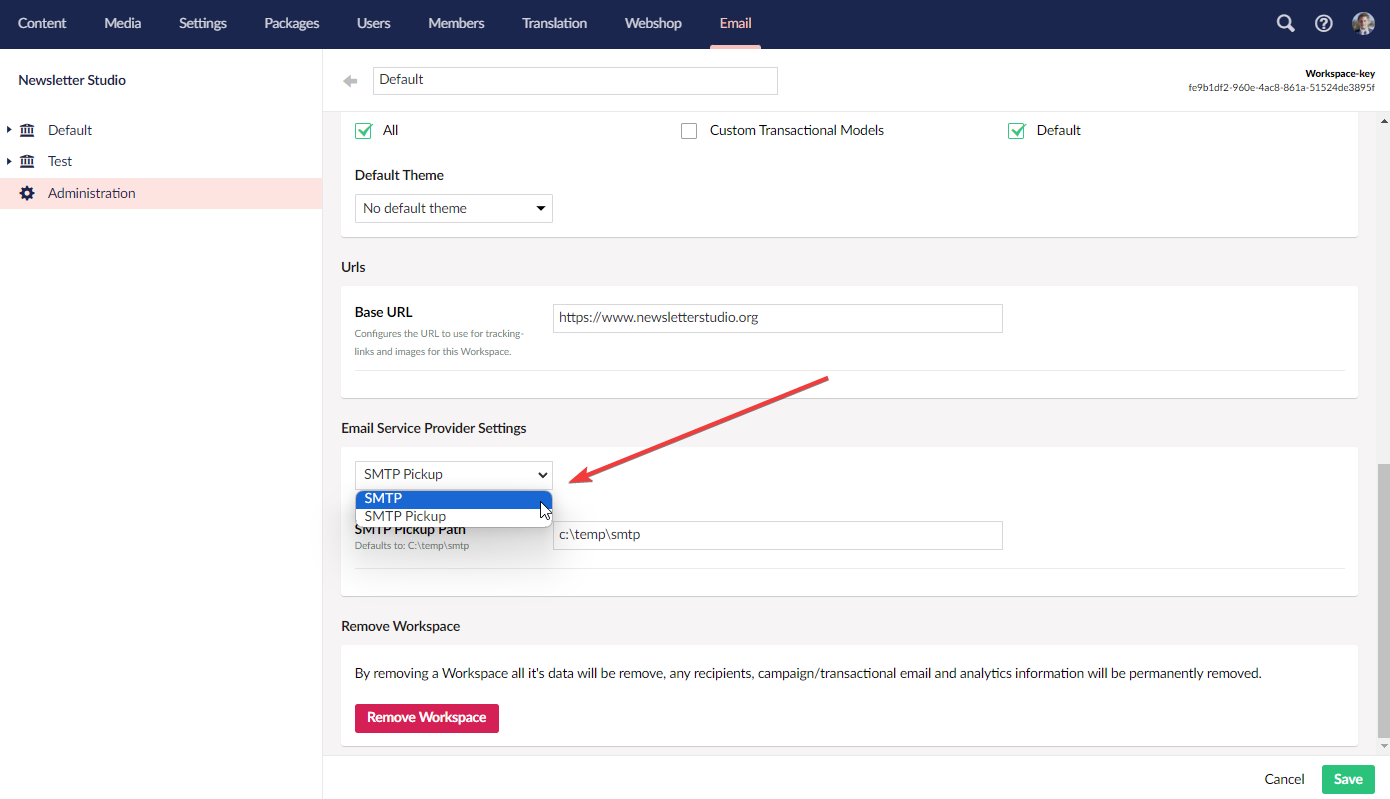
The Email Service Provider needs to be configured in the Administration-section for each Workspace.
Use some of the open source providers above as inspiration. Here is a simple example of an "empty" provider:
using NewsletterStudio.Core.Models.System;
using NewsletterStudio.Core.Notifications;
using NewsletterStudio.Core.Sending;
using NewsletterStudio.Core.Sending.Providers;
using Umbraco.Cms.Core.Events;

namespace Demo.Web.Extensions.EmailServiceProvider;

public class CoolEmailCompanyEmailServiceProvider : IEmailServiceProvider
{
    private readonly IEventAggregator _eventAggregator;

    public string Alias => "coolEmail";

    public string DisplayName => "Cool Email";

    public Dictionary<string, object> Settings { get; set; }

    public CoolEmailCompanyEmailServiceProvider(IEventAggregator eventAggregator)
    {
        _eventAggregator = eventAggregator;
    }

    public SendOutConfiguration GetSendOutConfiguration()
    {
        return new SendOutConfiguration()
        {
            MaxItemsPerBatch = 10,
            SendBatchSize = 10
        };
    }

    public Task<ErrorCollection> ValidateSettingsAsync(Dictionary<string, object> settings)
    {
        var errors = new ErrorCollection();

        var apiKeyValue = settings["cc_apiKey"]?.ToString();

        if (string.IsNullOrEmpty(settings["cc_apiKey"]?.ToString()))
        {
            errors.Add(new ValidationError("cc_apiKey","API key is required"));
        }
        if (settings["cc_apiKey"]?.ToString() == "lorem")
        {
            errors.Add(new ValidationError("cc_apiKey", "API cannot be lorem"));
        }

        return Task.FromResult(errors);
    }

    public async Task SendAsync(List<SendEmailJob> batch)
    {
        foreach (var job in batch)
        {
            var fakeDtoForEmailService = new
            {
                sendTo = job.Message.To,
                body = job.Message.HtmlBody
            };

            // Fires the EmailSendingNotification to allow package consumers to make adjustments to
            // the model before calling upstream services.
            // This is optional for internal implementation but recommended if you plan to share
            await _eventAggregator.PublishAsync(new EmailSendingNotification(fakeDtoForEmailService)).ConfigureAwait(false);

            // Then send the email
            //_coolCompanyEmailApi.Send(fakeDtoForEmailService)

            var success = true;

            if (success)
            {
                job.Successful = true;
                job.ExternalId = "---id-if-provided-from-service";
            }
            else
            {
                job.ErrorMessage = "--error message---";
            }


        }

    }

    public async Task<CommandResult> SendAsync(EmailMessage message)
    {
        var fakeBulk = new List<SendEmailJob>();
        fakeBulk.Add(new SendEmailJob() { Message = message });

        await SendAsync(fakeBulk);

        var res = fakeBulk.First();

        if (res.Successful)
            return CommandResult.Successful();

        return CommandResult.Error(new ValidationError("", res.ErrorMessage));

    }

}
Add the Email Service Provider to our list of services in your startup code:
using NewsletterStudio.Core.Composing;
using Umbraco.Cms.Core.Composing;

namespace Demo.Web.Extensions.EmailServiceProvider;

public class CoolCompanyComposer : IComposer
{
    public void Compose(IUmbracoBuilder builder)
    {
        builder.NewsletterStudio().EmailServiceProviders.Append<CoolEmailCompanyEmailServiceProvider>();
    }
}
Then, in the Workspace administration, the new provider should show up here:
You can also provide an extension for the backoffice to mount an element for settings related to the provider.
First, create an element to render:
import { UmbTextStyles } from '@umbraco-cms/backoffice/style';
import { css, html, customElement, state } from '@newsletterstudio/umbraco/lit';
import { NsEmailServiceProviderUiBase } from '@newsletterstudio/umbraco/extensibility';
import {NS_ADMINISTRATION_WORKSPACE_CONTEXT, NsAdministrationWorkspaceContext} from '@newsletterstudio/umbraco/administration';
import { umbBindToValidation } from '@umbraco-cms/backoffice/validation';

@customElement('cool-email-email-service-provider-settings')
export class CoolEmailServiceProviderSettingsElement extends NsEmailServiceProviderUiBase<CoolEmailServiceProviderSettings> {

  #workspaceContext? : NsAdministrationWorkspaceContext;

  @state()
  workspaceKey? : string;

  constructor() {
    super();

    this.consumeContext(NS_ADMINISTRATION_WORKSPACE_CONTEXT,(instance?) => {
      this.#workspaceContext = instance;

      this.observe(this.#workspaceContext?.workspaceKey,(workspaceKey) => {
        this.workspaceKey = workspaceKey;
      });

    });
  }

  /**
   * Notice the name renderSettings(), the parameter provided will be an object will all settings
   * @param settings
   * @returns
   */
  renderSettings(settings : CoolEmailServiceProviderSettings) {
    return html`
      <ns-property
        label="API Key"
        description="Enter the API key for Cool Company" required>
        <uui-form-layout-item>
          <uui-input type="text"
                      .value=${settings.cc_apiKey ?? ''}
                      name="cc_apiKey"
                      @change=${(e:Event)=>this.updateValueFromEvent('cc_apiKey',e)}
                      label="API Key"}
                      ${umbBindToValidation(this,'$.cc_apiKey',settings.cc_apiKey)}
                      required></uui-input>
        </uui-form-layout-item>
      </ns-property>

    `

  }

  static styles = [UmbTextStyles, css`
    uui-input {width:100%;}
  `]
}

export default CoolEmailServiceProviderSettingsElement;

declare global {
  interface HTMLElementTagNameMap {
    'cool-email-email-service-provider-settings': CoolEmailServiceProviderSettingsElement;
  }
}

interface CoolEmailServiceProviderSettings {
  cc_apiKey : string;
}
Then register the element as a nsEmailServiceProviderSettingsUi extension.
import { ManifestEmailServiceProviderSettingsUi } from "@newsletterstudio/umbraco/extensibility";

const smtpCoolCompanyUi : ManifestEmailServiceProviderSettingsUi = {
  type: "nsEmailServiceProviderSettingsUi",
  name: "Cool Company Email Service Provider Settings",
  alias: "Cc.EmailServiceProviderSettings",
  element: () => import('./cool-email-email-service-provider-settings.element.js'),
  meta: {
    // this alias should match alias in IEmailServiceProvider-implementation
    alias : 'coolEmail'
  }
};

export const manifests = [
    smtpCoolCompanyUi
]